AI Hoodie & Sweatshirt Packshots: sculpted volume and heavy fleece.
Showcase the rich density of your French Terry fleece. AI restores natural volume to slouchy hoods, aligns drawstrings, and sculpts the torso in 30 seconds.
The 3 physical hurdles of smartphone hoodie photography
Heavyweight fleece and bulky double-lined hoods make smartphone captures notoriously clumsy.
Drooping, asymmetrical lined hood
Under its own weight, the double-layered hood folds onto itself and flops sideways, obscuring the neckline and ruining the coveted structured streetwear look.
Flattened kangaroo pocket and ribbing
Lying flat, thick French Terry fleece loses all depth, while ribbed cuffs and waistbands stretch out unevenly across the table.
Twisted, misaligned drawstrings
Textile cords curl unpredictably and hang at mismatched lengths, requiring tedious manual pen-tool retouching in Photoshop to straighten out.
3 Packshot Styles in 1 Click: Which is right for your Hoodies?
From sculpted 3D invisible mannequins to urban streetwear lifestyle scenes.

Sculpted 3D Ghost Mannequin
The hood is propped up in dynamic volume, the neck tape revealed, and the chest puffed out as if worn by an atelier ghost mannequin.

Collection Overview & Colorway Grid
Align multiple hoodie colorways with identical lighting and posture for a perfectly coherent lookbook grid.
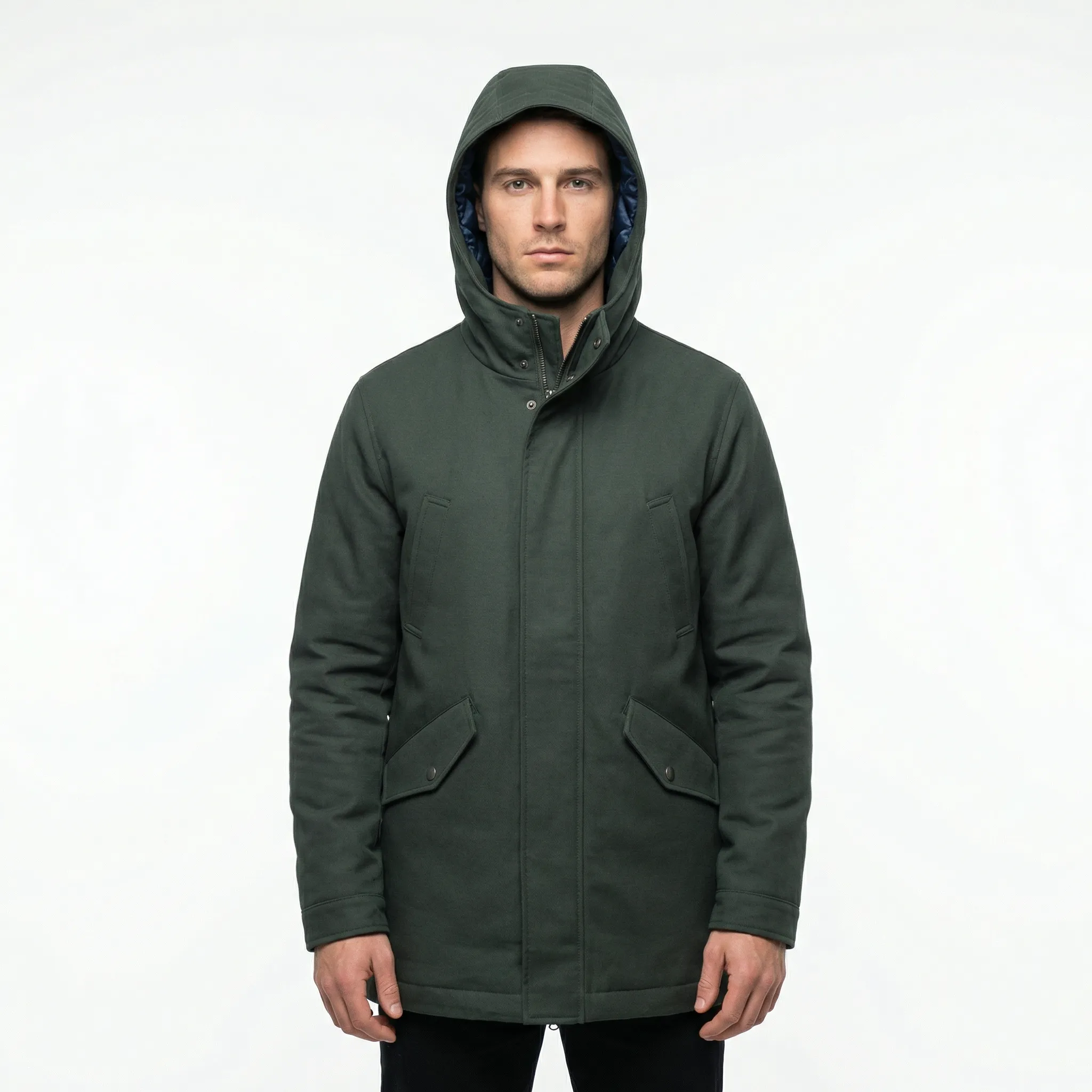
Urban Virtual Model Staging
Showcase your hoodie on a virtual model in realistic urban settings to demonstrate true sleeve fit, shoulder width, and overall drape.
Smartphone Protocol: Prep your Hoodie in 30 seconds
Achieve substantial fleece texture and 3D silhouette on your very first take.
Loosely spread the hood and straighten drawstrings
Open the hood gently without worrying if it stands on its own, and lay both drawstrings straight along the front zipper or kangaroo pocket.
Shoot straight-on at mid-chest level
Avoid shooting from high angles to prevent distorting the torso height. Hold your camera upright approximately 1.8 meters back.
Let AI build 3D depth and fabric softness
Our engine computes fleece thickness, hollows out the hood interior, and applies soft rim lighting to the ribbed cuffs and hem.
Studio Photographer Tip
Slip a small flat cardboard inside the kangaroo pocket during the photo to accentuate pocket depth for our 3D engine.
Frequently Asked Questions: Hoodie & Sweatshirt Packshots
Everything you need to know about our AI studio processing and precision for this product type.
Explore Our Other Packshot Guides
Discover how SnapPack adapts its image processing pipeline to the specific materials, weights, and volumes of each product category.



Pricing
Choose a plan that suits you
Choose a plan that fits your needs.
Running a Shopify store?
Install the app to manage your credits and plans directly on your monthly Shopify invoice.
Starter
-
50 images
-
Worn on mannequin
-
4K Images
-
History: 30 Days
Premium
-
150 images
-
Worn on mannequin
-
4K Images
-
History: 3 Months
-
Standard ProductivityAdd manual custom suffixes to your files for easier organization.
-
Multi-angle UploadCapture your product from multiple angles (front, back, details) so the AI perfectly understands its volume and details. Up to 3 images allowed. Essential for consistent packshots on all sides.
-
Custom Shape ModelsYou can choose and upload your own shape model to keep an exact positioning for your products.
-
Brand templates
Gold
-
350 images
-
Worn on mannequin
-
4K Images
-
History: 12 Months
-
Advanced ProductivityBarcode scanner, manual suffixes, and generation history retention up to 1 year.
-
Multi-angle UploadCapture your product from multiple angles (front, back, details) so the AI perfectly understands its volume and details. Up to 6 images allowed. Essential for consistent packshots on all sides.
-
Custom Shape ModelsYou can choose and upload your own shape model to keep an exact positioning for your products.
-
Brand templates
-
Custom Background
-
Priority Generation
-
Generation Presets (Bulk Mode)
-
Bulk ExportDownload all your generations at once in a single ZIP archive.
-
Bulk ImportUpload hundreds of images at once. Contact us to learn more.
-
Priority Support
Have a question or a bigger need?
Whether you want to produce a full catalog or simply understand which plan fits, we can review your case together in 30 minutes. You can also email us at contact@snappack.io.
Ready to upgrade your product pages?
Create your first studio visuals with SnapPack.
Upload your first smartphone photo and get a 4K studio render in under 30 seconds. Your first 5 photos are 100% free.